Showing posts with label MVVM. Show all posts

Computed properties in Xomega Framework

In this article you will get familiar with Xomega Framework, and will learn how to write testable and reusable multi-platform presentation logic for your applications. Specifically, you will learn how to implement computed properties using both the traditional MVVM approach and a new, simple but powerful expressions-based approach.

What is Xomega Framework

For those of you who are not familiar with the Xomega Framework, it's a powerful framework for building web and desktop applications in .NET using MVVM pattern with clean layer separation. It allows you to easily write most of your presentation logic in a platform-independent way, which not only makes it extremely testable, but also allows you to use (and reuse) it with completely different UI layers, such as WPF and Blazor, or even with the older WebForms framework.


This way you can share your presentation logic between different UI technologies for web, desktop or even mobile applications, and then easily upgrade the UI layer if a new UI framework becomes available, thus future-proofing your application.


Let's take a look at some of the major parts of the Xomega Framework.

Data Objects

Data objects represent a part of the View Model in the MVVM pattern that contains observable data, which the View can be bound to. Data objects consist of special data properties, as well as other child data objects.


A special type of data object is a list object, where the data is stored in data rows, and the data properties represent columns in a table.

Data Properties

Unlike regular object properties, Xomega Framework data properties encapsulate not only the data value or multiple values, but also dynamic property metadata, such as editability, visibility, security access, whether or not the property is required, a list of possible values, modification state, as well as formatting, validation and conversion rules for the values.


The framework has an extensible hierarchy of data properties, which represents various data types with their specific conversion and formatting rules.


Here is what a data object and some of its properties will look like for the SalesOrderDetail table from the AdventureWorks database.

public class SalesOrderDetailObject : DataObject
{
    public EnumIntProperty ProductIdProperty { get; private set; }
    public SmallIntegerProperty OrderQtyProperty { get; private set; }
    public EnumIntProperty SpecialOfferIdProperty { get; private set; }
    public MoneyProperty UnitPriceProperty { get; private set; }
    public PercentFractionProperty UnitPriceDiscountProperty { get; private set; }
    public MoneyProperty LineTotalProperty { get; private set; }
}

Property Change Events

Similar to the other classic MVVM frameworks, Xomega data properties allow you to subscribe to property change events. However, unlike notifying about only the value changes, like the INotifyPropertyChange interface, data properties can also notify you about changes in their metadata as well, such as when the property becomes editable or required, or when the list of possible values for the property has changed.


A single property change event can be fired for any change in the data property’s value or any of its metadata, and also for any combination of such changes. So a single event can notify you about changes in all property attributes at once, which would allow listeners, such as property-bound controls, to update all of its state at the same time.


It also means that when listening for just property value changes, for example, you need to check if the property change includes the value change to avoid unnecessary execution of your callback.

Binding to UI controls

One of the primary usage of the property change events is support for binding properties to UI controls. This would automatically include binding control’s state to the property metadata, which makes this binding extremely simple and easy to use.


Once a UI control is bound to the property, you can set the property to be editable, required or invisible, and the changes will be reflected in the UI control automatically,  without you having to bind those things separately.


Depending on the UI framework that you use, there could be two different ways to bind UI controls to data properties, as described below.

Control property bindings

With UI frameworks that allow you to associate additional attributes with the controls, such as attached properties in WPF, or custom attributes in WebForms controls, you can set the data property name on such controls, and have those controls bound to the data property using separate bindings.


This method allows you to bind any custom or third-party control that is derived from common UI controls to your data properties. Xomega Framework provides an extensible hierarchy of property bindings for both WPF and WebForms controls.


Here is an example of a WPF ComboBox control that is bound to the ProductId property using a static constant for the property name to provide compiler safety.

<ComboBox xmlns:xom="clr-namespace:Xomega.Framework;assembly=Xomega.Framework.Wpf"
          xom:Property.Label="{Binding ElementName=lblProductId}"
          xom:Property.Name="{x:Static o:SalesOrderDetailObject.ProductId}" />

The same control in WebForms would look as follows.

<asp:DropDownList LabelID="lblProductId" Property="<%# SalesOrderDetailObject.ProductId %>"
                  AutoPostBack="true" runat="server" />

Property bound controls

In other UI frameworks where using separate property bindings is not supported or problematic, you can develop and use custom UI controls that can be bound to Xomega data properties.


Xomega Framework provides a set of common Blazor components that you can bind directly to your data properties.


For example, a view with Blazor components that is bound directly to the properties of our SalesOrderDetailObject would look as follows.

<div>
    <XLabel Property="@VM?.MainObj?.ProductIdProperty" Text="Product:" />
    <XSelect Property="@VM?.MainObj?.ProductIdProperty" />
</div>
<div>
    <XLabel Property="@VM?.MainObj?.OrderQtyProperty" Text="Order Qty:" />
    <XInputText Property="@VM?.MainObj?.OrderQtyProperty" />
</div>
<div>
    <XLabel Property="@VM?.MainObj?.SpecialOfferIdProperty" Text="Special Offer:" />
    <XSelect Property="@VM?.MainObj?.SpecialOfferIdProperty" />
</div>
<div>
    <XLabel Property="@VM?.MainObj?.UnitPriceProperty" Text="Unit Price:" />
    <XDataLabel Property="@VM?.MainObj?.UnitPriceProperty" />
</div>
<div>
    <XLabel Property="@VM?.MainObj?.UnitPriceDiscountProperty" Text="Unit Price Discount:" />
    <XDataLabel Property="@VM?.MainObj?.UnitPriceDiscountProperty" />
</div>
<div>
    <XLabel Property="@VM?.MainObj?.LineTotalProperty" Text="Line Total:" />
    <XDataLabel Property="@VM?.MainObj?.LineTotalProperty" />
</div>
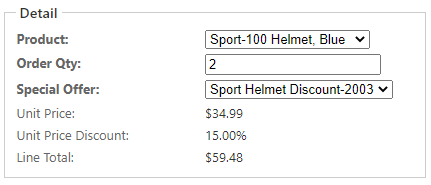
  
When you run the application and open that view, it will look as shown below.


We used appropriate edit controls, such as dropdown lists and a textbox, for the first three fields that the user can enter. The last three fields are calculated based on the selected values of the first three fields, and cannot be entered directly by the user. So we used a display-only XDataLabel component for them, which is also bound to our properties.


Note also that the properties are automatically displayed using proper formatting, such as currency or percent.

Computed Properties

As you saw earlier, calculated display-only fields on a view are bound to data properties, where the value is not entered by the user, but is rather computed from the values of other data properties.


Specifically, the Unit Price is calculated based on the selected Product, and the Discount is calculated based on the selected Special Offer. Those selected values are represented by a Xomega Framework class Header, which stores an internal Id, the display text, and an arbitrary number of named attributes. The values of the unit price and discount are stored as special attributes of those selections, as you will see below.


The Line Total property is computed based on the specified quantity and the calculated unit price and discount. Let’s take a look at how to implement such computed properties using Xomega Framework.

Computed properties via events

The most straightforward way to implement a computed property is to add property change listeners to any other data properties that it depends upon, and then recalculate the computed value whenever the value of any of those data properties changes.


To implement the Unit Price we can override the OnInitialized method on our data object, and add a listener to the ProductIdProperty, which will update the UnitPriceProperty as follows.

protected override void OnInitialized()
{
    base.OnInitialized();
 
    ProductIdProperty.Change += (sender, e) =>
    {
        if (e.Change.IncludesValue())
        {
            UnitPriceProperty.SetValue(ProductIdProperty.IsNull() ? null : 
                                       ProductIdProperty.Value["list price"]);
        }
    };
}

Note how we check if the change includes value, since data property changes may be fired for other metadata changes.


To implement the computed property for the Unit Price Discount, we will add a similar listener to the SpecialOfferIdProperty, and will set the value of the discount from an attribute of the selected special offer as follows.

SpecialOfferIdProperty.Change += (sender, e) =>
{
	if (e.Change.IncludesValue())
	{
		UnitPriceDiscountProperty.SetValue(SpecialOfferIdProperty.IsNull() ? null : 
                                          SpecialOfferIdProperty.Value["discount"]);

		UnitPriceDiscountProperty.Visible = !UnitPriceDiscountProperty.IsNull() &&
                                                     UnitPriceDiscountProperty.Value > 0;
	}
};

In the same listener we update the visibility of the discount property in order to hide the field if there is no discount.


Finally, to implement the computed Line Total property, we will first add two helper functions: GetLineTotal that calculates the line total for supplied nullable values, and the UpdateLineTotal property change listener, which uses that function to set the value of the LineTotalPoperty from the values of the other properties, as follows.

private decimal GetLineTotal(decimal? price, decimal? discount, int? qty) =>
    (price ?? 0) * (1 - (discount ?? 0)) * (qty ?? 0);
 
private void UpdateLineTotal(object sender, PropertyChangeEventArgs e)
{
    if (e.Change.IncludesValue())
    {
        LineTotalProperty.SetValue(GetLineTotal(UnitPriceProperty.Value,
            UnitPriceDiscountProperty.Value, OrderQtyProperty.Value));
    }
}

Now we just need to update the OnInitialzied method, and add the UpdateLineTotal as a listener to all the properties, whose values it depends on, as shown below.

    ProductIdProperty.Change += UpdateLineTotal;
    SpecialOfferIdProperty.Change += UpdateLineTotal;
    OrderQtyProperty.Change += UpdateLineTotal;

Remember that all this presentation logic is contained entirely in the data object, and does not depend on the actual UI layer, which means that you can reuse it with any UI framework.

Computed properties via expressions

While implementing computed properties via events, as described earlier, could be the most straightforward way, it’s not the simplest or the most natural one. Adding all these property listeners that recalculate values of other properties can get very tedious. And even after you add them all, you will have a hard time understanding how each computed property is calculated. You also need to be very careful when changing any of the calculations to make sure you add new listeners for any additional properties that computed value uses, and remove the listeners for the properties that it no longer depends on.


A more natural way to define computed properties is to just express the formula for calculating the value, and let the system update the computed value whenever the other properties change. This would be similar to defining such formulas for calculated cells in an Excel spreadsheet.


In order to support this, Xomega Framework added a new feature, where you can define an expression that takes any number of data objects or data properties and returns the computed value as an object. Then you call the SetComputedValue method on the target computed property, and pass that expression to it along with references to the actual objects for the expression’s arguments.


With this approach, setting up the computed UnitPriceProperty with an expression that takes the current data object will be very easy and succinct, as shown below.

protected override void OnInitialized()
{
    base.OnInitialized();
 
    // computed property using the entire object
    Expression<Func<SalesOrderDetailObject, object>> xPrice = sod =>
        sod.ProductIdProperty.IsNull(null) ? null : sod.ProductIdProperty.Value["list price"];
    UnitPriceProperty.SetComputedValue(xPrice, this);
}

You can make it even more succinct and easier to read, if you make the expression based on specific data properties rather than a data object, as shown in the following snippet, which sets up the price discount based on the special offer.

    // computed property using individual property
    Expression<Func<EnumProperty, object>> xDiscount = spOf =>
        spOf.IsNull(null) ? null : spOf.Value["discount"];
    UnitPriceDiscountProperty.SetComputedValue(xDiscount, SpecialOfferIdProperty);

If you want to set up computed metadata, such as visibility or editability, based on the values or metadata of other properties, then you can use a similar expression that returns a bool. For example, the following code shows how to make the price discount visible only if its own value (the discount) is greater than zero.

    // computed visible attribute based on discount value
    Expression<Func<PercentFractionProperty, bool>> xVisible = dp =>
        !dp.IsNull(null) && dp.Value > 0;
    UnitPriceDiscountProperty.SetComputedVisible(xVisible, UnitPriceDiscountProperty);

Finally, to configure more complex computed properties, such as our LineTotalProperty, we can make the expression use our helper function GetLineTotal, and just pass it the values of individual data properties, as follows.

    // computed total using a helper function
    Expression<Func<SalesOrderDetailObject, decimal>> xLineTotal = sod =>
        GetLineTotal(sod.UnitPriceProperty.Value,
                     sod.UnitPriceDiscountProperty.Value,
                     sod.OrderQtyProperty.Value);
    LineTotalProperty.SetComputedValue(xLineTotal, this);

Using helper functions like this will allow you to keep the expressions easy to read and implement, since you will no longer be limited by the expression syntax in the helper functions, and can use the full gamut of C# features there.

Conclusion

In this article you have learned the basic principles of Xomega Framework that uses observable data properties and data objects to implement reusable presentation logic of your application independent of the UI framework being used.


You saw how the property change events can be used both for binding data properties to UI controls, and to implement computed properties.


And lastly, you learned how the new Xomega Framework features allow you to easily set up computed properties using clear and concise expressions for the calculated value, without the hassle of managing any property listeners.


Please feel free to try out these new cool features of the Xomega Framework, and let us know how you like them.


Xomega Architecture for ASP.NET Applications

Classic ASP.NET web applications mostly run on the web server, which processes HTTP requests from the client browser and then either serves static resources, such as images, JavaScript or CSS files, or generates and returns dynamic resources, which are mainly HTML that may be mixed with dynamically generated JavaScript code and CSS classes. That HTML is then rendered on the client browser, which also executes any scripts within the HTML. Those scripts may in turn issue asynchronous AJAX requests to the server, which would return the response either as HTML snippets or in some other format.

Most of the UI logic is implemented on the web server in the middle tier along with the business logic for the application. The middle tier can access the database or any other external services to read or update the data.

The following diagram demonstrates how the ASP.NET web application architecture is implemented using the default Xomega solution template.


Presentation Tier

The presentation tier that runs in the browser consists primarily in rendering the HTML response from the web server, executing any scripts contained therein and applying the stylesheets. The scripts typically provide client side validations of the user input, but may do some basic DOM manipulation or issue additional server side AJAX requests to call a web service on the server side or make a partial page request.

Middle Tier

Middle tier, which runs in the web server, has a layered structure with a Business Logic Layer, Service Layer and the Web Forms UI layer, which follows the Model-View-View Model (MVVM) development paradigm and in turn consists of Views, View Models and Code behind. All static resources such as HTML templates, JavaScript files, CSS and images are served by a standard Web Server like IIS.

The Views that represent the visual panels and controls get bound to the corresponding View Models that store the actual Model data for the view, the state and meta-data for that model data, such as whether this data is editable or required or the list of values it can accept, and also provide any functions that validate the data on the UI side or convert the data from one format to another, e.g. between the UI format and the internal values.

The actual UI logic is encapsulated in the Code behind that runs when the client sends GET or POST requests to the corresponding ASPX page (View) and acts as a Controller in the classic MVC approach. It instantiates a new View Model or retrieves the cached one from the current session and then binds it to the current View using Xomega Framework, which provides two-way binding. This means that whenever the user changes anything on the screen it will be automatically propagated to the model and vice versa – when the application changes the view model, it will be automatically reflected in the view that is bound to it.

The view models are implemented using Xomega Framework data object classes, which significantly simplifies both defining such data objects and its properties by providing all the plumbing for them such as validations, data conversion and formatting, lists of values and so forth, as well as binding view elements to those properties by implementing custom web bindings. These Xomega data objects may implement significant part of the UI behavior without any dependency on the web application, which means that you can reuse them in other types of clients such as desktop or Silverlight by simply binding them to a different XAML view.

Moreover, Xomega Framework data objects for the application are mostly automatically generated from the Xomega service model operations described in this document with ability to extend them in separate classes, so that the data objects could be regenerated any time the service model changes. The standard views with code behind for search and details pages can also be initially generated from the Xomega service model, which can help boost the development productivity as the developers could start with an 80% or so complete working view and then update it and add the remaining 20% of functionality.

The page’s Code behind handles any user actions on the server side and calls the services provided by the Service Layer to read the data for the data objects and save the user updates from the data objects into the database.

All service interfaces and structures for data contracts (also known as Data Transfer Objects or DTO) in the Service Layer are generated automatically from the Xomega service model. This allows providing alternative mock implementations of the services for testing purposes. The service implementation classes can also be initially generated from the Xomega service model, which speeds up the development process, but the developers need to implement any remaining service logic manually from that point on.

The service implementation classes use Entity Framework (EF) and LINQ to read the data from the database and persist the changes to the data. The Entity Data Model (EDM) is automatically generated from the Xomega object model and the classes for the corresponding entities are in turn generated from the EDM either by the built-in Visual Studio generator or by a T4 text template depending on whether you use the legacy Object Context or the latest DB context.

The generated entity classes can be extended to provide data validation, propagation and recalculation, which form the Business Logic Layer. This allows for all this entity functionality to be reused across multiple services and ensure data validity and integrity regardless of which service is updating this data. Business Logic Layer may also include a number of background tasks and services that run in the middle tier either on a scheduled basis or in response to external events.

Data Tier

The data tier (also called persistence tier) is implemented as a relational SQL server database that is hosted in its own database server. Most of the communication with the database from the middle tier can be handled automatically by the Entity Framework and LINQ queries. However, the middle tier may call the database directly to invoke a stored procedure or run a SQL query.

The SQL server database may also have its own internal logic implemented using T-SQL in the stored procedures or triggers that runs directly in the database.

Xomega Architecture for Silverlight Web Applications

Silverlight web applications are downloaded from the web server and executed inside the web browser by the Silverlight plug-in, which provides a restricted version of the .Net framework with limited access to the file system, threading model and other system resources.

In order to read data from the server and save changes Silverlight client makes WCF service calls using any WCF bindings that are supported by Silverlight. Typically the WCF services are hosted on the same web server and the client uses HTTP bindings and XML (SOAP) format.

The following diagram demonstrates how the Silverlight web application architecture is implemented using the default Xomega solution template.

Presentation Tier

Presentation tier, which runs in the browser, follows the Model-View-View Model (MVVM) development paradigms where the Views that represent the visual panels and controls get bound to the corresponding View Models that store the actual Model data for the view, the state and meta-data for that model data, such as whether this data is editable or required or the list of values it can accept, and also provide any functions that validate the data on the client side or convert the data from one format to another, e.g. between the UI format and the internal values.

The actual presentation tier logic is encapsulated in the Code behind that runs when the client navigates to the corresponding XAML view. It instantiates a new View Model and then binds it to the current View using Xomega Framework, which provides two-way binding. This means that whenever the user changes anything on the screen it will be automatically propagated to the model and vice versa – when the application changes the view model, it will be automatically reflected in the view that is bound to it. The code behind reads any data from the middle tier into the View Model, and also handles UI events and updates the middle tier as a result.

The view models are implemented using Xomega Framework data object classes, which significantly simplifies both defining such data objects and its properties by providing all the plumbing for them such as validations, data conversion and formatting, lists of values and so forth, as well as binding view elements to those properties by implementing custom WPF bindings. These Xomega data objects may implement significant part of the UI behavior without any dependency on the Silverlight application, which means that you can reuse them in other types of clients such as desktop or ASP.NET by simply binding them to a different XAML or ASPX view respectively.

Moreover, Xomega Framework data objects for the application are mostly automatically generated from the Xomega service model operations described in this document with ability to extend them in separate classes, so that the data objects could be regenerated any time the service model changes. The standard views with code behind for search and details pages can also be initially generated from the Xomega service model, which can help boost the development productivity as the developers could start with an 80% or so complete working view and then update it and add the remaining 20% of functionality.

Middle Tier

The middle tier, which runs on the web-based application server, also has a layered structure with Business Logic Layer, Service Layer and the WCF Web Services, which are built on top of the service layer to expose these services over the web.

Static resources such as HTML pages, JavaScript files, CSS and images, as well as the actual Silverlight application package XAP, are served by a standard Web Server like IIS.

Service interfaces and data contracts (also known as Data Transfer Objects or DTO) in the Service Layer are generated automatically from the Xomega service model and decorated with WCF attributes to enable exposing service contracts as Web Services. The service and endpoint configurations as well as any IIS service host files are also generated from the Xomega model.

The service implementation classes can also be initially generated from the Xomega service model, which speeds up the development process, but the developers need to implement any remaining service logic manually from that point on.

The service implementation classes use Entity Framework (EF) and LINQ to read the data from the database and persist the changes to the data. The Entity Data Model (EDM) is automatically generated from the Xomega object model and the classes for the corresponding entities are in turn generated from the EDM either by the built-in Visual Studio generator or by a T4 text template depending on whether you use the legacy Object Context or the latest DB context.

The generated entity classes can be extended to provide data validation, propagation and recalculation, which form the Business Logic Layer. This allows for all this entity functionality to be reused across multiple services and ensure data validity and integrity regardless of which service is updating this data. Business Logic Layer may also include a number of background tasks and services that run in the middle tier either on a scheduled basis or in response to external events.

Data Tier

The data tier (also called persistence tier) is implemented as a relational SQL server database that is hosted in its own database server. Most of the communication with the database from the middle tier can be handled automatically by the Entity Framework and LINQ queries. However, the middle tier may call the database directly to invoke a stored procedure or run a SQL query.

The SQL server database may also have its own internal logic implemented using T-SQL in the stored procedures or triggers that runs directly in the database
.

Xomega Architecture for Client/Server Desktop Applications

Client/Server desktop application represents a simpler version of multi-tier desktop application architecture where the business logic resides on the presentation tier, which communicates directly with the database.

This architecture is more appropriate for standalone applications that do not require any direct communications with external systems or any background services that have to run regardless of whether the desktop application is running for any users.

The following diagram demonstrates how the client-server desktop application architecture is implemented using the default Xomega solution template.


Presentation Tier

Presentation tier, which runs as a windows application on the user’s machine, has a layered architecture where the UI layer interacts with the Service Layer wrapped around the Business Logic Layer.

The UI layer follows the Model-View-View Model (MVVM) development paradigms where the Views that represent the visual forms and controls defined in XAML get bound to the corresponding View Models that store the actual Model data for the view, the state and meta-data for that model data, such as whether this data is editable or required or the list of values it can accept, and also provide any functions that validate the data on the client side or convert the data from one format to another, e.g. between the UI format and the internal values.

The actual presentation tier logic is encapsulated in the Code behind that runs when the user opens the corresponding WPF form. It instantiates a new View Model and then binds it to the current View using Xomega Framework, which provides two-way binding. This means that whenever the user changes anything on the screen it will be automatically propagated to the model and vice versa – when the application changes the view model, it will be automatically reflected in the view that is bound to it. The code behind reads any data from the Service Layer into the View Model, and also handles UI events and updates the middle tier as a result.

The view models are implemented using Xomega Framework data object classes, which significantly simplifies both defining such data objects and its properties by providing all the plumbing for them such as validations, data conversion and formatting, lists of values and so forth, as well as binding view elements to those properties by implementing custom WPF bindings. These Xomega data objects may implement significant part of the UI behavior without any dependency on the WPF application, which means that you can reuse them in other types of clients such as Silverlight or ASP.NET by simply binding them to a different XAML or ASPX view respectively.

Moreover, Xomega Framework data objects for the application are mostly automatically generated from the Xomega service model operations described in this document with ability to extend them in separate classes, so that the data objects could be regenerated any time the service model changes. The standard search and details forms with code behind can also be initially generated from the Xomega service model, which can help boost the development productivity as the developers could start with an 80% or so complete working form and then update it and add the remaining 20% of functionality. To make the generated forms calls the service layer directly the Service Invocation parameter of the generator should be set to “Direct”.

Service interfaces and data contracts (also known as Data Transfer Objects or DTO) in the Service Layer are generated automatically from the Xomega service model. This allows providing alternative mock implementations of the services for testing purposes.

The service implementation classes can also be initially generated from the Xomega service model, which speeds up the development process, but the developers need to implement any remaining service logic manually from that point on.

The service implementation classes use Entity Framework (EF) and LINQ to read the data from the database and persist the changes to the data. The Entity Data Model (EDM) is automatically generated from the Xomega object model and the classes for the corresponding entities are in turn generated from the EDM either by the built-in Visual Studio generator or by a T4 text template depending on whether you use the legacy Object Context or the latest DB context.

The generated entity classes can be extended to provide data validation, propagation and recalculation, which form the Business Logic Layer. This allows for all this entity functionality to be reused across multiple services and ensure data validity and integrity regardless of which service is updating this data.

Data Tier

The data tier (also called persistence tier) is implemented as a relational SQL server database that is hosted in its own database server. Most of the communication with the database from the middle tier can be handled automatically by the Entity Framework and LINQ queries. However, the presentation tier may call the database directly to invoke a stored procedure or run a SQL query.

The SQL server database may also have its own internal logic implemented using T-SQL in the stored procedures or triggers that runs directly in the database.

Xomega Architecture for Multi-Tier Desktop Applications

Multi-tier desktop applications are typically used in internal enterprise systems that are not exposed over the web. The presentation tier runs on the user's machine and connects to the middle tier to read and update the enterprise data. The middle tier performs any validation and propagation logic to ensure data validity and consistency. It may service multiple clients and possibly provide different types of interfaces for different clients.

The following diagram demonstrates how the multi-tier desktop application architecture is implemented using the default Xomega solution template.


Presentation Tier

Presentation tier, which runs as a windows application on the user’s machine, follows the Model-View-View Model (MVVM) development paradigms where the Views that represent the visual forms and controls defined in XAML get bound to the corresponding View Models that store the actual Model data for the view, the state and meta-data for that model data, such as whether this data is editable or required or the list of values it can accept, and also provide any functions that validate the data on the client side or convert the data from one format to another, e.g. between the UI format and the internal values.

The actual presentation tier logic is encapsulated in the Code behind that runs when the user opens the corresponding WPF form. It instantiates a new View Model and then binds it to the current View using Xomega Framework, which provides two-way binding. This means that whenever the user changes anything on the screen it will be automatically propagated to the model and vice versa – when the application changes the view model, it will be automatically reflected in the view that is bound to it. The code behind reads any data from the middle tier into the View Model, and also handles UI events and updates the middle tier as a result.

The view models are implemented using Xomega Framework data object classes, which significantly simplifies both defining such data objects and its properties by providing all the plumbing for them such as validations, data conversion and formatting, lists of values and so forth, as well as binding view elements to those properties by implementing custom WPF bindings. These Xomega data objects may implement significant part of the UI behavior without any dependency on the WPF application, which means that you can reuse them in other types of clients such as Silverlight or ASP.NET by simply binding them to a different XAML or ASPX view respectively.

Moreover, Xomega Framework data objects for the application are mostly automatically generated from the Xomega service model operations described in this document with ability to extend them in separate classes, so that the data objects could be regenerated any time the service model changes. The standard search and details forms with code behind can also be initially generated from the Xomega service model, which can help boost the development productivity as the developers could start with an 80% or so complete working form and then update it and add the remaining 20% of functionality.

Middle Tier

The middle tier, which runs as a separate service on the same or a different machine, also has a layered structure with Business Logic Layer, Service Layer and the WCF Services, which are built on top of the service layer to expose these services to the clients using any supported WCF bindings. Typically internal clients would use a binary serialization format over the TCP or named pipes protocols for the best performance.

Service interfaces and data contracts (also known as Data Transfer Objects or DTO) in the Service Layer are generated automatically from the Xomega service model and decorated with WCF attributes to enable exposing service contracts as WCF Services. The service and endpoint configurations are also generated from the Xomega model.

The service implementation classes can also be initially generated from the Xomega service model, which speeds up the development process, but the developers need to implement any remaining service logic manually from that point on.

The service implementation classes use Entity Framework (EF) and LINQ to read the data from the database and persist the changes to the data. The Entity Data Model (EDM) is automatically generated from the Xomega object model and the classes for the corresponding entities are in turn generated from the EDM either by the built-in Visual Studio generator or by a T4 text template depending on whether you use the legacy Object Context or the latest DB context.

The generated entity classes can be extended to provide data validation, propagation and recalculation, which form the Business Logic Layer. This allows for all this entity functionality to be reused across multiple services and ensure data validity and integrity regardless of which service is updating this data. Business Logic Layer may also include a number of background tasks and services that run in the middle tier either on a scheduled basis or in response to external events.

Data Tier

The data tier (also called persistence tier) is implemented as a relational SQL server database that is hosted in its own database server. Most of the communication with the database from the middle tier can be handled automatically by the Entity Framework and LINQ queries. However, the middle tier may call the database directly to invoke a stored procedure or run a SQL query.

The SQL server database may also have its own internal logic implemented using T-SQL in the stored procedures or triggers that runs directly in the database.